How Do I Connect AnkerWork B600 to a Computer?

To connect PowerConf B600 to a computer, please follow these steps:


1. Connect the video bar to a computer using the provided USB-C to USB-C cable (or other Anker USB-C to USB-C cables with a length of less than 2 m and a transfer speed of 480 mbps).


2. Connect the video bar to a power supply using the provided power adapter (or a USB wall charger with an output of at least 5V/2A).


3. Open the software you want to use with the video bar. The LED indicator will turn blue when communication software (such as Zoom) is using its microphone or camera.
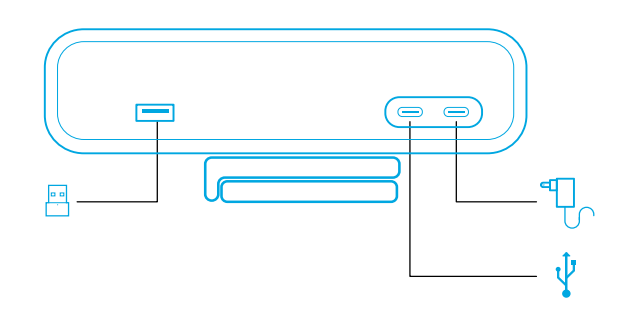
 

Note:

1. The USB-A port can only support Anker's wireless headphones (such as the PowerConf H700) with a USB receiver. You can pair your headphones with the video bar for the best experience.


2. The LED indicator will flash red if the power adapter is connected to the data port by mistake.


If you have additional questions, please contact us for further assistance.

How Do I Connect AnkerWork B600 to a Computer?
50 undefined
How to Locate the Serial Number on AnkerWork Products?
2629 views/1 likes/2025-04-08 17:19:14
Parts & Accessories
2400 views/1 likes/2025-04-08 17:19:06
About AnkerWork App
1802 views/1 likes/2025-04-08 17:19:06
Payments & Vouchers FAQ
3682 views/1 likes/2024-11-27 10:08:25
What if the FoV is Too Large on My PowerConf Webcam?
659 views/1 likes/2025-04-08 17:19:24
How Do I Connect AnkerWork B600 to a Computer?
225 views/1 likes/2025-04-08 17:19:16
What if the Image is Blurred on my PowerConf Webcam?
275 views/1 likes/2025-04-08 17:19:13
A3961 QSG V2(1)
Liberty 4_A3953_QSG
Q20i_QSG
EU Declaration of Conformity for soundcore A3i_A3992
UK&CA Declaration of Conformity for soundcore Liberty 4_A3953
EU&UK Declaration of Conformity for soundcore Sleep A10_A6610
View More
How to use Liberty 4 Wellness features
How to Connect to the Soundcore App and Update Firmware for Sport X10
How to Wear Liberty 4 and Change Eartips
How to solve a connection issue on Sleep A10
How to Use Features On the Soundcore App for Sport X10
How to Pair and Reset Sport X10
View More




