How Do the Indicators of AnkerWork B600 Work?
AnkerWork B600 has different indicators with different meanings.
When both data and power cables are correctly connected:
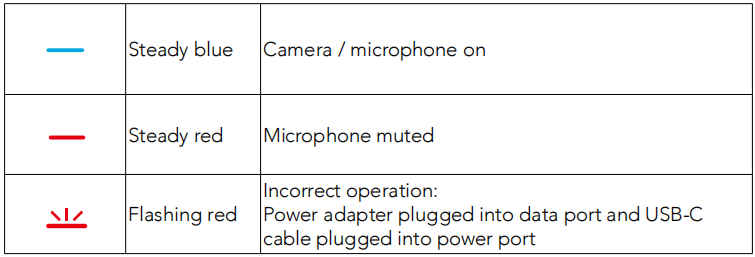
There are no LED prompts when only the power cable is connected.
If you have additional questions, please contact us for further assistance.


50 undefined
How to Locate the Serial Number on AnkerWork Products? 4225 views 1 likes/2025-04-08 17:19:14
Parts & Accessories 3605 views 1 likes/2025-04-08 17:19:06
Payments & Vouchers FAQ 2796 views 1 likes/2025-12-29 17:34:13
About AnkerWork App 3194 views 1 likes/2025-04-08 17:19:06
How to Install and Use AnkerWork Software for AnkerWork B600? 1835 views 1 likes/2025-04-08 17:19:24
What if the FoV is Too Large on My PowerConf Webcam? 1426 views 1 likes/2025-04-08 17:19:24
What Should I Do If There is a Connection Issue with My AnkerWork B600? 866 views 1 likes/2025-04-08 17:19:12
What if My PowerConf Webcam Makes Autofocus Too Frequently? 1034 views 1 likes/2025-04-08 17:19:13
What if the Image is Blurred on my PowerConf Webcam? 882 views 1 likes/2025-04-08 17:19:13
How Do I Connect AnkerWork B600 to a Computer? 535 views 1 likes/2025-04-08 17:19:16

AnkerWork BR300 A3387 Manual

soundcore AeroClip دليل المستخدم (A3388)

soundcore AeroClip מדריך למשתמש (A3388)

soundcore AeroClip Uživatelská Příručka (A3388)

soundcore AeroClip Brugervejledning (A3388)

soundcore AeroClip Benutzerhandbuch (A3388)
View More


How to Set Up AnkerWork B600


Unboxing AnkerWork B600 Video Bar


How to Turn On AnkerWork B600’s Light


How to Use AnkerWork B600’s Software Application


How to Adjust AnkerWork B600’s Light


How to Manually Adjust AnkerWork B600’s Volume
View More
