How to Connect PowerConf with a Mobile Device?
Follow the steps given below to pair the PowerConf to your smartphone, tablet, or other mobile devices:
- Turn on the Bluetooth setting on your mobile device.
- To enter pairing mode, press and hold the Bluetooth button on the speakerphone for 2 seconds.
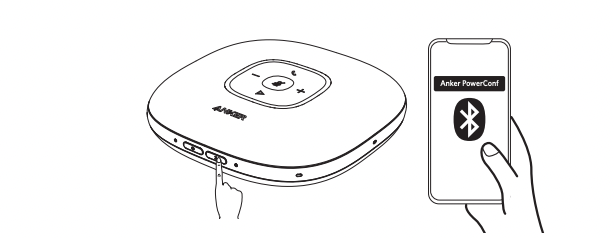
- To pair, go to the Bluetooth menu on your mobile device and select the PowerConf from the list of available devices.
If you have additional questions, please contact us for further assistance.

How to Connect PowerConf with a Mobile Device?


81 undefined
How to Update the Firmware of a PowerConf Speakerphone?
6680 views/
1 likes/2025-04-08 17:19:06
How to Reset a PowerConf Speakerphone?
3024 views/
1 likes/2025-04-08 17:19:03
A Brief Comparison among Anker PowerConf Speakerphones
2772 views/
1 likes/2025-04-08 17:19:06
How to Connect PowerConf and PowerConf S3 with Your PC?
10763 views/
1 likes/2023-03-17 09:42:19
How to Locate the Serial Number on AnkerWork Products?
2637 views/
1 likes/2025-04-08 17:19:14
Parts & Accessories
2416 views/
1 likes/2025-04-08 17:19:06
How to Connect Two PowerConf S500 Together?
1385 views/
1 likes/2025-04-08 17:19:25
About AnkerWork App
1818 views/
1 likes/2025-04-08 17:19:06
Get the most out of your Anker PowerConf S500 speakerphone (A3305)
8144 views/
2 likes/2022-04-11 18:43:51
How to Connect PowerConf+ with Your PC?
998 views/
1 likes/2025-04-08 17:19:01

A3961 QSG V2(1)

Liberty 4_A3953_QSG

Q20i_QSG

EU Declaration of Conformity for soundcore A3i_A3992

UK&CA Declaration of Conformity for soundcore Liberty 4_A3953

EU&UK Declaration of Conformity for soundcore Sleep A10_A6610
View More


How to use Liberty 4 Wellness features


How to Connect to the Soundcore App and Update Firmware for Sport X10


How to Wear Liberty 4 and Change Eartips


How to solve a connection issue on Sleep A10


How to Use Features On the Soundcore App for Sport X10


How to Pair and Reset Sport X10
View More
