You can visit software.anker.com to download and install the AnkerWork software.
AnkerWork software features:
1. Device
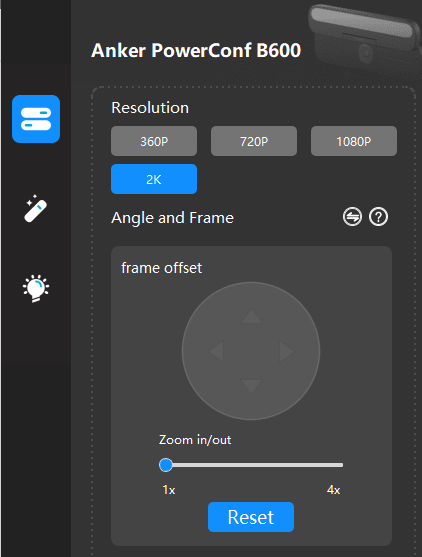
Resolution:
There are four resolution options for you: 360p, 720p, 1080p, and 2K.
Angle and frame:
- The field of view (FoV) is the total observable area the camera can see at any given moment. The maximum FoV is 95°.
- If the self-frame option is chosen, the camera will follow the person nearest to the camera.
- AnkerWork software has a customized zoom feature. In order to use the zoom in/out feature, go to Device > Angle and Frame > Switch. In doing so, you can use this function and customize FoV settings based on your preferences.
Anti-flicker:
An anti-flicker frequency of 50Hz or 60Hz can be selected to reduce the flicker of recorded images in environments lit by artificial light like fluorescent lights or LED screen lighting.
2. Image
There are four image settings for your PowerConf webcam: brightness, sharpness, saturation, and contrast ratio. You can customize the settings based on your preferences.
3. Light
You can turn on/off the light, adjust the brightness and color temperature, and set the light to always be on or enable automatic light adjustment. When automatic light adjustment is on, the light brightness automatically adjusts to the brightness of a person's face.
4. Other settings
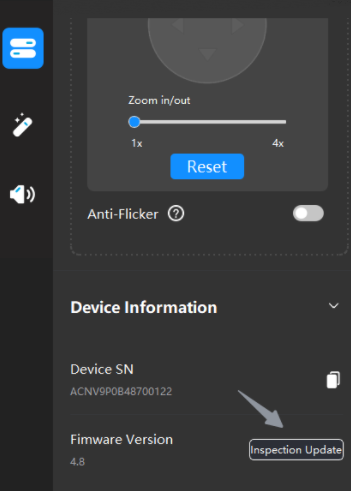
Update the video bar's firmware by going to "Device" in the left top corner, then go to Select Device > Device > Inspection Update.
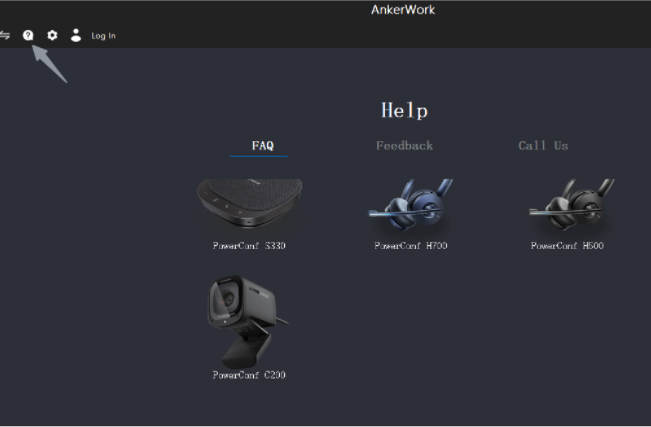
View the FAQ and get in contact with technical support by clicking the question mark.
If you have additional questions, please contact us for further assistance.







