|
Question |
Answer |
|
Why is there no sound or response after connecting AnkerWork S600 to my computer? |
1. Make sure to connect your computer using the USB-C data port, and to connect the charging cable to the USB-C charging port. 2. Set S600 as the default audio device in your computer's system settings for both input and output. a) For Windows: - Right click the volume icon in the lower right corner of the desktop. - Select "Open Sound Settings." - Select AnkerWork S600 Speakerphone for "Input" and "Output." b) For macOS: - Click "System Preferences" in the top left corner of the desktop. - Choose a sound output device. - Select AnkerWork S600 Speakerphone for "Input." - Select AnkerWork S600 Speakerphone for "Output." 3. Set S600 speakerphone as the default audio device in your conferencing software. - Go to the audio options of your conferencing software. - Select AnkerWork S600 as both the microphone and speaker. |
|
Is AnkerWork S600 compatible with landline phone systems? |
No. |
|
How do I connect AnkerWork S600 to a device? |
- Connect to mobile devices via Bluetooth. - Connect to computers or laptops via USB or Bluetooth. USB connection is recommended for more stable audio data transfer. |
|
Can AnkerWork S600 be connected via USB and Bluetooth simultaneously? If so, which connection will take priority? |
S600 can be connected via USB and Bluetooth simultaneously. Here's how it works: - Music: The device playing music will take priority until you press the pause button on S600. Once music paused, the other device can take over. - Calls: If one device is being used for a call, it will take priority until the call ends. - Priority of Music and Calls: Calls take precedence over music. |
|
Why might adjusting the volume of AnkerWork S600 on one device not work when my phone and computer are both connected to S600? |
S600 will prioritize the signal from the Bluetooth device that is currently using it. For example, if you're playing music through S600 from your computer, adjusting the volume on the phone may not sync with S600. Simply switch to playing music from your phone to control S600's volume. |
|
Why does the AnkerWork app maintain a connection with the first device when connecting a third device to the S600, which already has two Bluetooth devices connected? |
S600 supports a maximum of two device connections. However, when a third Bluetooth device is connected, the signal may be occupied by the first two devices. To connect a new device to the AnkerWork app, you can manually disconnect one of the first two connected devices before attempting a new connection. |
|
When connecting AnkerWork S600 to a device using a USB cable, what is the maximum length of the cable that can be used? |
Using a cable that is too long may lead to unstable output or connection issues. It is recommended to use a cable that's no more than 3 meters (9.8 ft) long. |
|
Can AnkerWork S600 be powered and transfer data through just one USB-C port. |
- If S600 is connected via only the data port for both data transfer and power supply, wireless charging may stop or S600 might shut down due to insufficient power. When wireless charging is not being used, charging and data transfer can be handelled simultaneously with just a data port connection. - When S600 is only connected to power, data transfer can be conducted with Bluetooth devices via Bluetooth. |
|
How do I update S600's firmware? |
You can update AnkerWork S600’s firmware using the AnkerWork computer software on your computer or the AnkerWork app on your phone: To update using AnkerWork computer software: - Download the AnkerWork software here: http://software.anker.com/ - Connect AnkerWork S600 to your computer via USB. - Open the AnkerWork software and select AnkerWork S600. - Follow the instructions to complete the update. To update using the AnkerWork app: - Install the AnkerWork app on your phone from your phone's app store. - Connect your phone to AnkerWork S600 via Bluetooth. - Open the AnkerWork app and select AnkerWork S600 - Go to More Information > Update Firmware, then follow the instructions to complete the update. When S600 has less than 20% power, please recharge it before attempting to update firmware. |
|
How can I check the battery level of AnkerWork S600? |
- You can check via the AnkerWork app. - Press the power button when S600 is turned on to display the battery level on the bottom indicator ring. |
|
How do I reset AnkerWork S600? |
Long press the Bluetooth button and press the volume down button five times to reset S600. |
|
How can I improve the microphone pickup of AnkerWork S600? |
- Stay within 3 meters (9.8 ft) of the speakerphone when talking. - Remember to update your firmware. - Try using a USB connection for computers and laptops. |
|
Does S600 support daisy-chaining? |
No. |
|
Why is S600 charging slowly or losing battery even with a power adapter connected? |
- Make sure the charger is connected to the charging port, not the data port. - Use a charger with at least a 30W output. |
|
How do I record a personal voiceprint on AnkerWork S600? |
Insall the AnkerWork app on your phone, connect to S600, and follow the prompts on the AnkerWork app to complete your voiceprint recording. Note: - Ensure the environment is quiet during recording. - Do not pause for more than 5 seconds when reading the text. - Make sure S600 is not on a call or meeting. - Stay within 50 cm (1.6 ft) of the speakerphone. |
|
Why does AnkerWork S600 not respond or only flash a white light when pressing the Voiceprint button? |
You are required to record your personal voiceprint via the AnkerWork app before using the noise reduction feature. After successful recording, you can toggle the noise reduction function by pressing the voiceprint button. |
|
Why might voiceprint samples on AnkerWork S600 speakerphone be lost after a firmware update? |
To improve audio quality, we continuously train our audio algorithms, which may overwrite existing voiceprints during an update. Please re-record your voiceprint if necessary. |
|
Why was I prompted about high noise levels when recording a voiceprint? |
For accurate voiceprint samples, please record in a quiet space. If the AnkerWork app indicates high noise, find a quieter space and re-record. |
|
Why can't AnkerWork S600 continuously deliver wireless charging without being connected to a power adapter? |
Wireless charging is always available when connected to the 30W power adapter. When the power adapter is not connected: a) Wireless charging will stop when the battery falls below 20%. b) If S600 was unplugged from the power adapter before reaching 80% battery, wireless charging won't auto-resume. Manually press the power button twice or restart S600 to enable wireless charging. |
|
Why doesn't my phone attach to S600's wireless charging pad? |
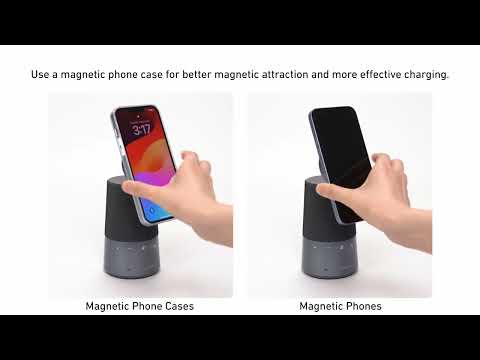
- Make sure your phone supports magnetic attachment. - Remove your phone case or use a magnetic phone case to avoid any obstruction between the phone and the charging pad. |
|
Why doesn't S600's wireless charging output reach 15W? |
- To achieve optimal wireless charging, ensure that the speakerphone is being charged with the included 30W USB-C PD charger. - A phone that supports Qi2 is required to achieve 15W charging. - When S600 is being charged and used for a meeting at the same time, wireless charging will be limited to 10W. |
|
Why isn't there a MagSafe charging animation when charging an iPhone with AnkerWork S600? |
The MagSafe charging animation requires an iPhone from the 13, 14, or 15 series, running iOS 17.2. |
|
Does a phone case affect wireless charging? |
- To achieve the best wireless charging experience, use official magnetic cases. - Avoid cases thicker than 2.5 mm or non-magnetic cases as they may affect charging. - Magnetic/metal attachments, grips, stands, keys, or credit cards can interfere with wireless charging. |
|
Is it safe to use AnkerWork S600 when the wireless charging pad gets warm? |
Slight warming during wireless charging is normal, especially after extended use. |
|
How does the wireless charging speed of AnkerWork S600 compare to traditional wired chargers? |
Wireless charging speeds may vary by device and are generally slower than wired charging due to lower energy conversion rates. |
|
Why do my AirPods stop charging for a few seconds and then resume when charging wirelessly with AnkerWork S600? |
AirPods cases have an overheating protection feature that may periodically pause charging for a few seconds before resuming. |
|
What features does the AnkerWork app support? |
You can: - Adjust volume. - Record a voiceprint and turn voiceprint on/off. - Turn sound prompts on/off. - Turn indicator lights on/off. - Adjust button light settings to always on or only on touch. - Adjust auto-shutdown timer settings. - Update firmware. |
|
Does AnkerWork S600 have an auto-shutdown feature? |
S600 automatically shuts down after 15 minutes of standby. You can adjust the auto-shutdown time settings or disable this feature via the AnkerWork app. |
|
Can the light effects and auto-shutdown features on AnkerWork S600 be turned off? |
Yes, you can adjust these two features in the AnkerWork app under "More Settings". - Control the light bar during calls and set button lights to "always on" or "on when touched." - Set "Auto Shutdown Timer" to 5, 10, 15, or 30 minutes. Please note that S600 won't auto-shutdown when connected to power. |