There are several reasons for image overexposure; software, image related settings and usage environment are the most common. If the image is overexposed on your PowerConf webcam, please try the following steps:
1. Update the firmware to the latest version.
2. Enable the HDR feature on AnkerWork Software.
HDR refers to contrast between the brightness and darkest parts of an image. Your eyes can perceive whites that are brighter and blacks that are darker than traditional SDR TVs are able to display. Note: When HDR is turned on, the FPS adjusts to 30 FPS automatically.

3. Customize the image settings (decrease the brightness and Contrast Ratio in particular).
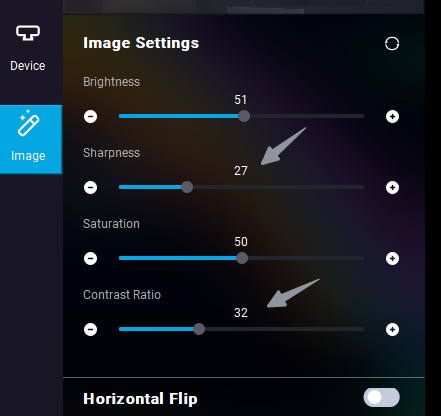
4. Avoid using the webcam in a backlit environment.
If you have additional questions, please contact us for further assistance.


